Cinematic studio portrait AI prompts: 4 moody chest-up looks with rim light
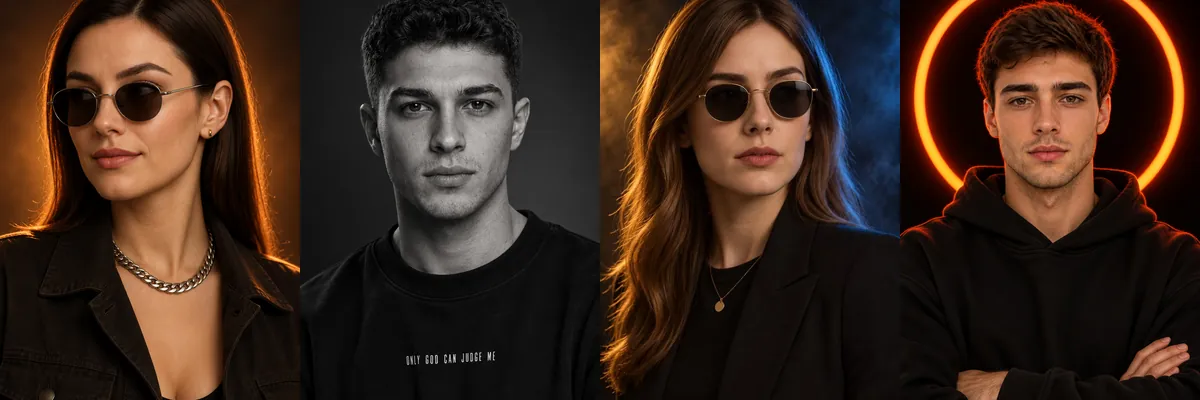
These are chest-up studio portraits built on dark backdrops and strong edge lighting, the kind used for profile pictures, creator banners and personal branding. The looks rely on black clothing, rim light and shallow focus rather than busy sets.
Each prompt is a Reshot AI template you can open with a selfie in the iPhone app, or copy into another tool. The prompts ask to keep your facial identity, hairstyle and skin tone while changing the outfit, light and background.
How these templates use your photo
Each template starts from a photo you pick. The prompt tells the model what to change, and your photo is the reference for everything else. Clear, front-facing photos with even light give the closest match.
1. Amber glow with silver chain
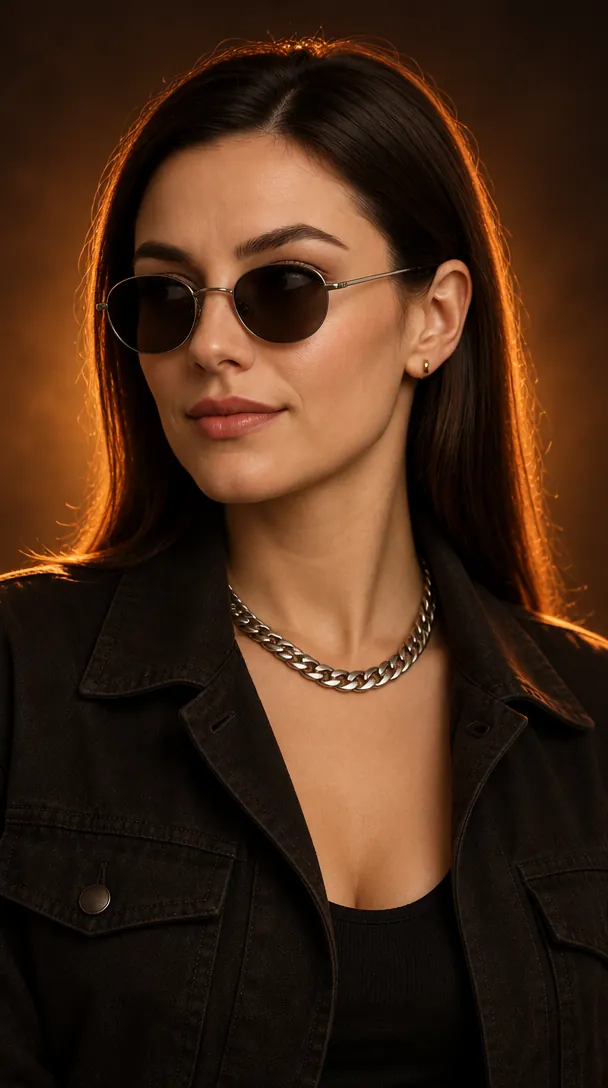
A three-quarter chest-up portrait in a charcoal utility jacket, a heavy silver Cuban-link chain and small round tinted sunglasses against a brown-black backdrop with a soft amber glow. Warm front light from camera left keeps facial features and skin texture visible beside the orange rim light.
Create an ultra-realistic cinematic chest-up portrait of the uploaded person, preserving their natural facial identity, facial proportions, skin tone, hairstyle, and recognizable features. Position the subject centrally, upper body facing almost toward the camera, head turned to a clear three-quarter angle toward the left side of the frame. The subject looks slightly off-camera with a confident, mysterious aura. Dress the subject in a dark charcoal-black open-collar utility jacket or structured overshirt with subtle fabric texture. Add a thick polished silver Cuban-link chain and small round dark-tinted sunglasses with thin silver metal frames and realistic studio reflections. Use a dark brown-black studio background with a soft, diffused amber-orange glow behind the subject’s head, naturally fading into burnt orange, deep brown, and near-black toward the frame edges. No visible circle, ring, or defined edge. Use intense warm orange backlighting to create a crisp rim glow around the hair, shoulders, jawline, and jacket edges. Add soft, controlled warm front lighting from the camera-left side to keep facial features and natural skin texture clearly visible, with deep cinematic shadows on the opposite side. Eye-level camera, centered chest-up framing, full hair visible with comfortable headroom, balanced spacing, 85mm portrait lens, shallow depth of field, sharp facial and accessory details, smooth background falloff, rich orange-and-black cinematic color grading, high contrast, realistic metallic highlights, polished editorial finish, subtle filmic texture. 9:16 aspect ratio. No text, logos, or decorative elements. **Negative Prompt:** different identity, altered facial features, distorted face, unnatural skin, plastic skin, blurry details, bad anatomy, extra fingers, deformed hands, low quality, overexposure, flat lighting, visible background rings, text, watermark, logo, AI artifacts.
2. Black-and-white sweatshirt portrait
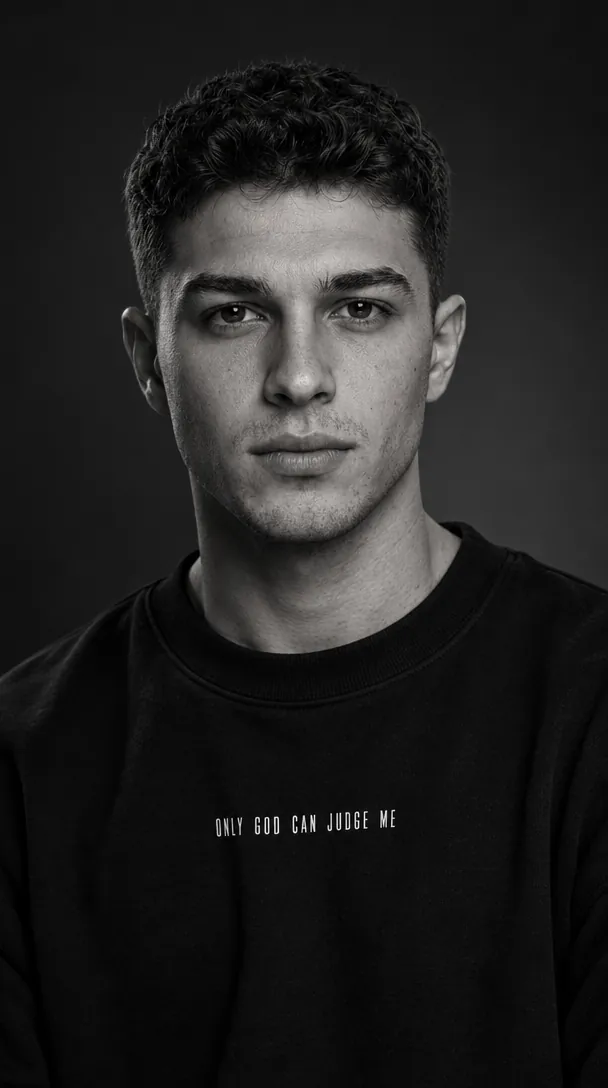
A monochrome 9:16 portrait in an oversized black crew-neck sweatshirt with a small white chest print, set on a charcoal-to-gray gradient. A single soft key light from the front right keeps the eyes and hair texture sharp while shadow falls across the opposite cheek.
Use the uploaded photo only as the subject’s facial identity reference. Preserve the same natural facial structure, skin tone, hairstyle, and masculine appearance without beautifying or changing the person. Create a premium black-and-white studio portrait in a vertical 9:16 aspect ratio. Frame the subject from mid-chest upward, centered and facing toward the camera with a very confident expression and natural eye contact. Give him a neatly styled haircut. Dress him in a plain oversized black crew-neck sweatshirt with subtle realistic fabric texture. Add a small, sharp white condensed uppercase chest print reading: “ONLY GOD CAN JUDGE ME”. Use dramatic low-key editorial lighting: one soft key light illuminating the face from the front-right, with deeper shadow across the opposite cheek and jawline. Keep the eyes, hair texture, skin pores, and facial details crisp and sharply focused. Background should be a seamless dark charcoal-to-soft-gray studio gradient, minimal and uncluttered. High contrast, cinematic monochrome tones, realistic DSLR portrait photography, 85mm lens look, shallow depth of field, premium fashion-editorial finish, 8K resolution.
3. Quiet-luxury blazer and gold frames
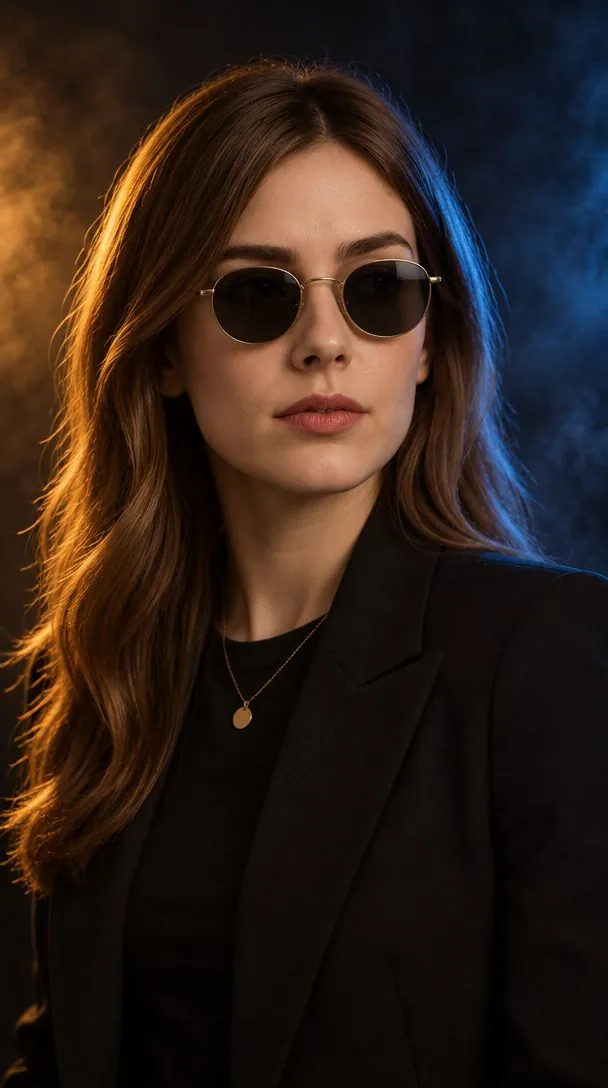
A chest-up editorial portrait in a matte black blazer over a black tee, a thin gold pendant chain and round gold-rimmed sunglasses, with the head turned away from the shoulders. The prompt keeps the real facial structure, age and existing hairstyle, changing only pose, outfit, lighting and background.
Edit the attached photo of this person into a hyper-realistic luxury editorial studio portrait. This is the same individual from the uploaded image — keep their real facial structure, proportions, skin tone, natural skin texture, age, and gender exactly as photographed. Only change expression, pose, outfit, lighting, and background as described below. Do not beautify, reshape, or alter their face — this should look like them, styled and lit differently, not a different person. **POSE & EXPRESSION:** Chest-up portrait. Shoulders rotated around 30° to one side, head turned the opposite way, gaze confidently off-camera. Relaxed, elegant posture. Expression is calm, composed, serious, and powerful — quiet-luxury confidence, not smiling. Keep their existing hairstyle, groomed to a polished, premium finish. **STYLING:** Monochrome luxury fashion — a matte black tailored blazer over a plain fitted black crew-neck T-shirt, high-quality matte fabric with subtle texture, deep black and dark charcoal tones only. Add a thin gold chain necklace with a small circular pendant if it suits the subject. Minimal round sunglasses with a thin gold metal frame and dark black lenses. **CAMERA:** Vertical portrait framing, eye-level angle, shot like an 85mm lens at f/1.8 — face and eyes tack-sharp, background thrown into strong smooth bokeh, ultra-detailed DSLR-level realism. **LIGHTING:** Premium cinematic studio lighting. Soft neutral-white key light from the front-left, medium intensity. Strong warm golden-orange rim light glowing along the hair and one shoulder. A medium electric-blue rim light along the opposite edge. Very soft, low fill light that preserves dramatic contrast. High overall cinematic contrast. **BACKGROUND:** Deep black studio backdrop fading into dark charcoal with a smooth gradient. Soft blue smoke drifting on one side, warm golden glow blooming behind the opposite shoulder. Clean, atmospheric, no clutter or distracting shapes. **COLOR GRADE:** Black, gold, and blue palette. High contrast, rich but controlled saturation, warm golden highlights, deep black shadows. Bold, premium, cinematic overall mood. **QUALITY:** Authentic photograph quality, not illustration, painting, CGI, or 3D render. Natural skin with real visible texture and pores — avoid smoothed, plastic, or airbrushed skin. Avoid noise, banding, warped anatomy, extra/missing fingers, duplicated jewelry, text, logos, or watermarks. Should look like a real luxury magazine studio shoot.
4. Orange ring light halo
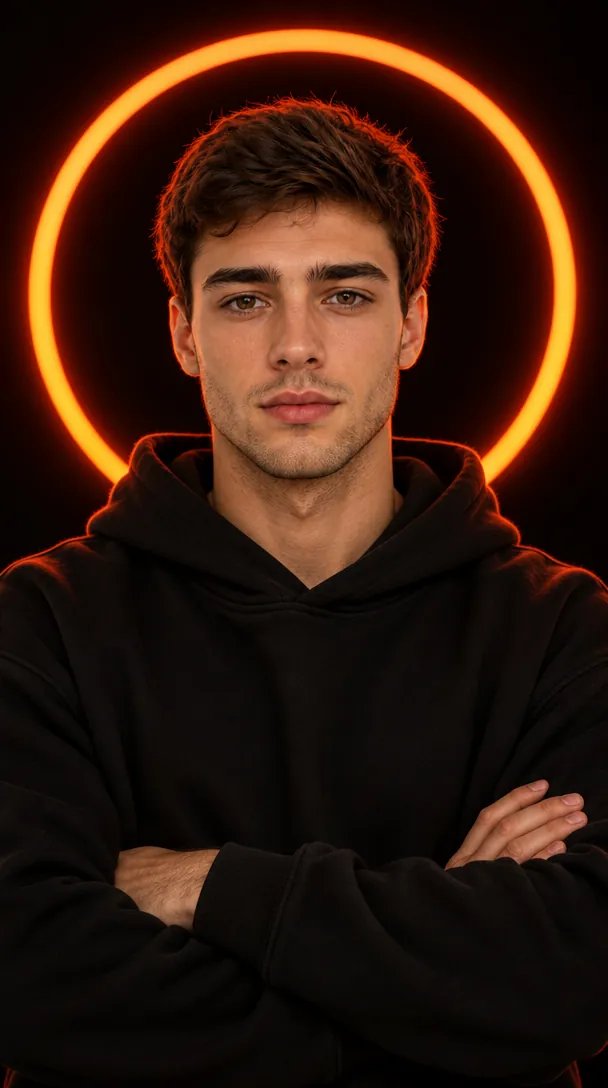
A large glowing orange-red ring sits behind the head on a pure black backdrop, with arms crossed in a plain black hoodie. The face stays softly lit inside the dark center of the circle, and the prompt avoids adding a beard, glasses or a new hairstyle.
Use the uploaded image only for the person’s face and identity reference. Preserve the same facial features, skin tone, age, gender, hairstyle, hair length, and facial hair with high accuracy. Do not add beard, glasses, accessories, or change the hairstyle unless they already exist in the reference. Create a cinematic low-key studio portrait of the person centered in frame, facing the camera with a calm confident expression and relaxed direct eye contact. The person is wearing a plain matte-black oversized hoodie with no logo, no design, and no visible text. Pose them with arms crossed naturally across the chest, shoulders relaxed, upper body visible from head to crossed forearms. Place the person against a pure solid black seamless studio background. Directly behind the person’s head, add one large perfectly circular thick orange-red glowing ring light, like a sunset halo lamp. The ring must be centered behind the head, symmetrical, clearly visible, larger than the head and shoulders, with the face framed inside the dark center of the circle. The orange-red glow should create strong warm rim light along the hair edges, ears, hoodie shoulders, and outer arms, while the front face remains softly lit and realistic. Keep the composition exactly like a premium portrait: subject large in frame, head near the upper center, very little empty space above the glowing circle, arms visible at the bottom, clean black background, no props, no extra lights, no text, no watermark. Ultra-realistic professional photography, sharp facial focus, natural skin texture, soft shadow contrast, moody cinematic lighting, shallow depth of field, 85mm portrait lens look, high-detail editorial studio quality, vertical 9:16 aspect ratio.
How to use these templates in Reshot AI
- Open Reshot AI on iPhone and find the Cinematic Studio Portraits category on the home screen.
- Pick a template. Choose a clear, front-facing selfie with good light; it is the reference for your face.
- Generate. Results arrive in the app’s History, so you can come back for them later.
- Want a different expression in the result? Open it in the Face Editor and add a smile, open closed eyes, or turn the head.
Frequently asked questions
Will the result look like me?
Each template uses your photo as the reference and describes the look, not a new face. Clear, front-facing photos with even light give the closest match.
Can I use these prompts outside Reshot AI?
Yes. The copy button gives you the full prompt; it works in any image tool that accepts a reference photo. Results will differ by model.
Is Reshot AI free?
The app is free to download. Generating templates uses credits or a Premium subscription; details are in the app.
Try Cinematic Studio Portraits in Reshot AI
Download Reshot AI, pick a template, choose a selfie.
⬇ Download on the App Store