How to Fix Expressions in Group Photos
The universal law of group photos: the more people in the frame, the smaller the chance everyone looks good at once. Someone blinks, someone's smile drops, someone stares off-frame. Instead of merging five takes, you can fix every face in a group photo with AI — individually, in one image.
Why per-face editing beats taking more photos
Photographers used to fix group shots by compositing heads across frames — slow, manual, and error-prone. Reshot AI supports group photo facial expression editing natively: tap any face and adjust that person's smile, eyes, or head position while everyone else stays untouched. One good frame is now enough.
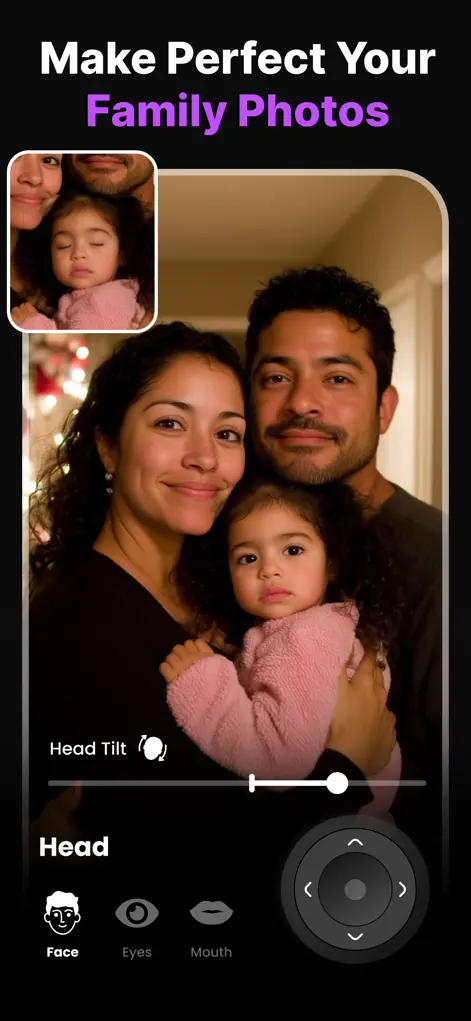
Step-by-Step: How to Fix Expressions in Group Photos
- Pick your best frame. Choose the shot with the best overall composition — lighting and poses matter more than expressions now.
- Tap the first problem face. Reshot AI detects each face separately. Start with the most obvious issue, like closed eyes or a missing smile.
- Fix that person, then move on. Open eyes with the eyelid slider, add a smile with the Smile Enhancer, redirect gaze to the camera, or level a head tilt — then tap the next face.
- Review the whole photo and export. Zoom out, compare before/after across the full group, and save in high resolution.
Group shots that edit well, and ones that don't
Per-face editing depends on each face being large and clear enough to work with. Small groups photographed at close range, where every face is sharp and turned toward the camera, give Reshot AI the best material. Rows of people in a wide shot, especially those at the back, are much harder.
Faces that are tiny, blurred, turned away, or partly blocked by someone else's head, a raised hand or sunglasses may not edit convincingly, and the app may not change them at all. Gentle fixes like a small smile or a slight gaze shift are more dependable than big ones. When one face can't be saved, check your other frames for a better take of that person.
A routine for family and event photos
The frames you take at the event decide how much editing is possible later.
- Take several shots in a row, not one, so you have options.
- Move closer so faces fill more of the frame; tight groups edit better than wide scenes.
- Ask people to take off sunglasses and keep hands away from their faces.
- Keep strong shadows off people's eyes, for example by turning the group toward the light.
Judging the finished photo
After fixing the problem faces, look at the whole picture at the size people will actually see it, on a phone or as a print. If the edits blend in at that size and everyone still looks like themselves, it is ready to share.
Try It on Your Own Photo
Expression Editor – Reshot AI is free to download on the App Store. Fix your first photo in under a minute.
⬇ Download Reshot AIFrequently Asked Questions
Can I edit each person separately in one photo?
Yes — Reshot AI detects every face and lets you adjust each one independently: smile, eyes, gaze, and head pose.
Does it work on large family photos?
It works on multi-person shots where faces are clearly visible. The closer and clearer each face, the better the result.
Can it fix one person who blinked AND another who frowned?
Yes, that's the core use case — different fixes on different faces in the same image.