How to Fix Head Tilt & Straighten Face in a Photo
An awkward head tilt can make a confident portrait look unsure, and a face angled too far from the camera loses connection. An AI head pose adjuster lets you straighten the tilt or rotate the head toward the camera after the photo is taken.
Can you really change a head angle after the shot?
Yes — within natural limits. Reshot AI's Head Pose Adjuster understands the 3D structure of the head from a single photo, so it can rotate and tilt it while regenerating the newly visible areas consistently with the original lighting and hair. Small to moderate corrections — the ones that actually bother people — look seamless.
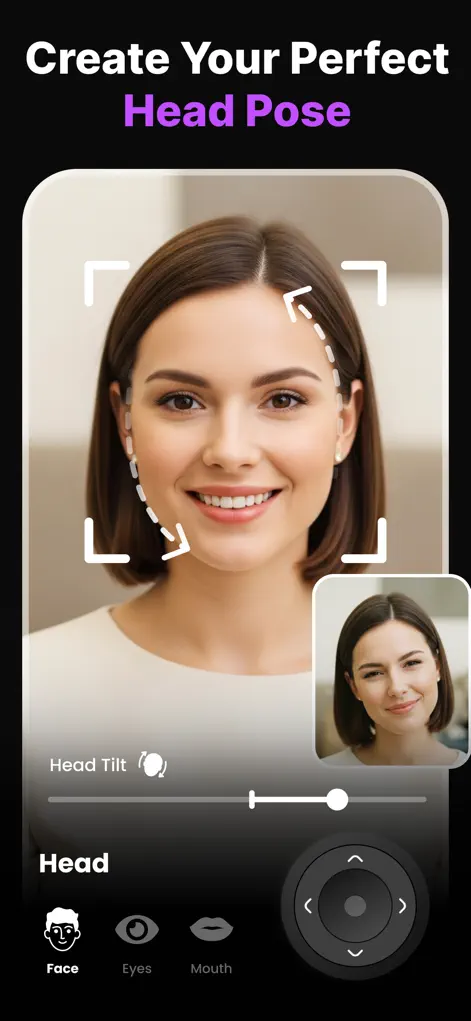
Step-by-Step: How to Fix Head Tilt & Straighten Face in a Photo
- Import the photo. Open Reshot AI and select the portrait or group photo with the awkward head angle.
- Open the Head Pose Adjuster. You'll see a head-tilt slider plus a directional adjustment pad for finer positioning.
- Straighten or rotate. Level a sideways tilt with the slider, or use the pad to turn the face a few degrees toward the camera. Watch the real-time preview.
- Balance the rest of the face. After a pose change, a tiny gaze adjustment often helps the eyes match the new angle. Compare and export.
Photos where a pose change works best
Head pose edits need a clear, reasonably large face that already points fairly toward the camera. Reshot AI has to fill in the parts of the head that come into view as it turns, so it has the easiest job with a sharp close-up and a modest correction.
It works poorly or not at all on small faces in wide shots, heads in near profile, heavily blurred photos, or faces partly hidden by hands, a low hat brim or sunglasses. Large rotations are less reliable than small ones. For those photos, choose a frame where the head was closer to the angle you want.
Tilt, turn, or a crooked camera?
Work out what is actually crooked before reaching for the pose controls. If the horizon, door frames and the person all lean the same way, the camera was tilted, and rotating the whole photo with your phone's crop tool is the right fix.
If the background is level and only the head leans toward one shoulder, that is a head tilt, and the tilt slider handles it. If the head is level but the face points off to one side, it is a turn, which is what the directional pad is for.
Many portraits have a little of each. Fix the tilt first, then the turn, then check whether the gaze still lands where it should.
Try It on Your Own Photo
Expression Editor – Reshot AI is free to download on the App Store. Fix your first photo in under a minute.
⬇ Download Reshot AIFrequently Asked Questions
Will changing the head pose distort the photo?
No — the AI regenerates the head region naturally rather than warping pixels, so backgrounds and hairlines stay clean for moderate adjustments.
Can I fix head tilt for one person in a group photo?
Yes, head pose is adjustable per face, so you can straighten one person without touching the others.
What's the difference between head pose and eye direction?
Head pose rotates the whole head; eye direction moves only the gaze. Natural corrections often use a little of both.